
Ever wanted to see your control panel as a flyout menu in Vista rather than having to click on it, wait for the whole window to load and then sort though the applets?
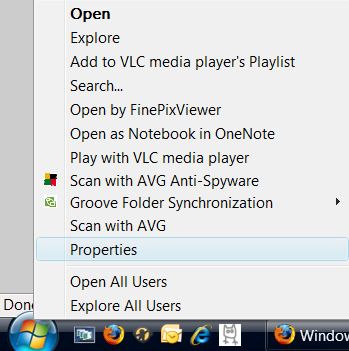
Fortunately, the solution is very straightforward. First right click on the Orb and select properties.
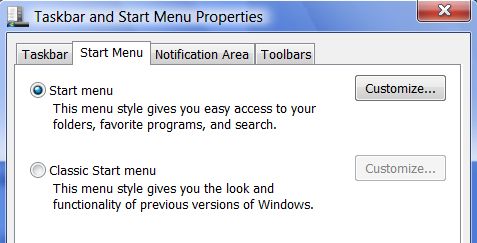
Then simply choose ‘Start Menu’ from the tabs (it should have been autoselected) and click on
Customise.
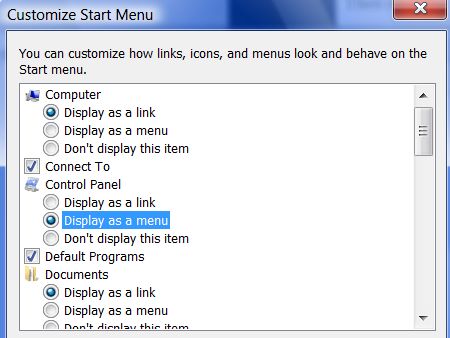
The resulting screen allows you then to choose how several of your start menu items should appear – including the Control Panel. Here I have selected it to appear as a ‘Menu’.
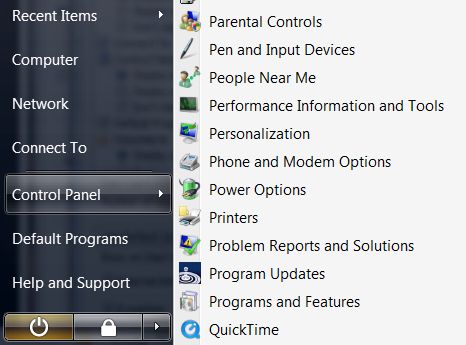
Accept this change (and any others you care to make) and voila! Control Panel as a Menu…
This post is very informative but it took me a long time to find it in google.
I found it on 22 spot, you should focus on quality backlinks building,
it will help you to increase traffic. And i know how to help you, just search in google – k2 seo
tips